Introduction to 3D Printing
Welcome to the world of 3D printing! In this section, you’ll explore the fundamentals of the technology, its various types, and the anatomy of a typical 3D printer. This knowledge serves as a foundation for your hands-on experiences in the lab.
What is 3D Printing?
Understanding 3D Printing
3D printing, also known as additive manufacturing, is a process of creating three-dimensional objects from a digital file. This is achieved by laying down successive layers of material until the object is complete. Each of these layers can be seen as a thinly sliced cross-section of the object.
Real-World Applications
3D printing has revolutionized various industries:
Prototyping: Engineers and designers use 3D printing to create prototypes quickly and cost-effectively, allowing for rapid iteration and development.
Healthcare: Customized prosthetics, dental implants, and even bioprinted organs are being developed using 3D printing technologies.
Aerospace and Automotive: Manufacturers produce lightweight, complex parts that are difficult or impossible to create with traditional methods.
Fashion and Footwear: Companies like Adidas are launching fully 3D-printed shoes, showcasing the technology’s potential in consumer products.
Additive vs. Subtractive Manufacturing
In additive manufacturing, objects are built by adding material layer by layer. In contrast, subtractive manufacturing involves removing material from a solid block to create the desired shape, such as in milling or drilling.
Additive manufacturing offers advantages like reduced material waste, the ability to create complex geometries, and faster prototyping cycles.
Types of 3D Printers
There are several types of 3D printing technologies, each with its own strengths and applications:
Fused Deposition Modeling (FDM)
FDM is the most common and accessible form of 3D printing. It works by melting and extruding thermoplastic filament through a heated nozzle, depositing material layer by layer to build the object. FDM printers are widely used in education, hobbyist projects, and prototyping due to their affordability and ease of use.
Tip
You will only be using an FDM-style 3D printer in the Foundations printing lab. The other types of 3D printers described below are for reference and comparison, to help you understand the differences between the various 3D printing technologies.
Stereolithography (SLA)
SLA printers use a laser to cure liquid resin into hardened plastic in a layer-by-layer fashion. This method produces high-resolution prints with smooth surface finishes, making it ideal for detailed prototypes and models.
Selective Laser Sintering (SLS)
SLS employs a laser to sinter powdered material, typically nylon or other polymers, fusing the particles together to form a solid structure. SLS does not require support structures, allowing for the creation of complex geometries. It’s commonly used in industrial applications for functional parts.
The USF 3D Printers - What We Use & Why
At the University of South Florida, we utilize FlashForge Adventurer 5M 3D printers. These FDM printers are chosen for their reliability, user-friendly interface, and suitability for educational environments. They provide a practical platform for students to learn the fundamentals of 3D printing.
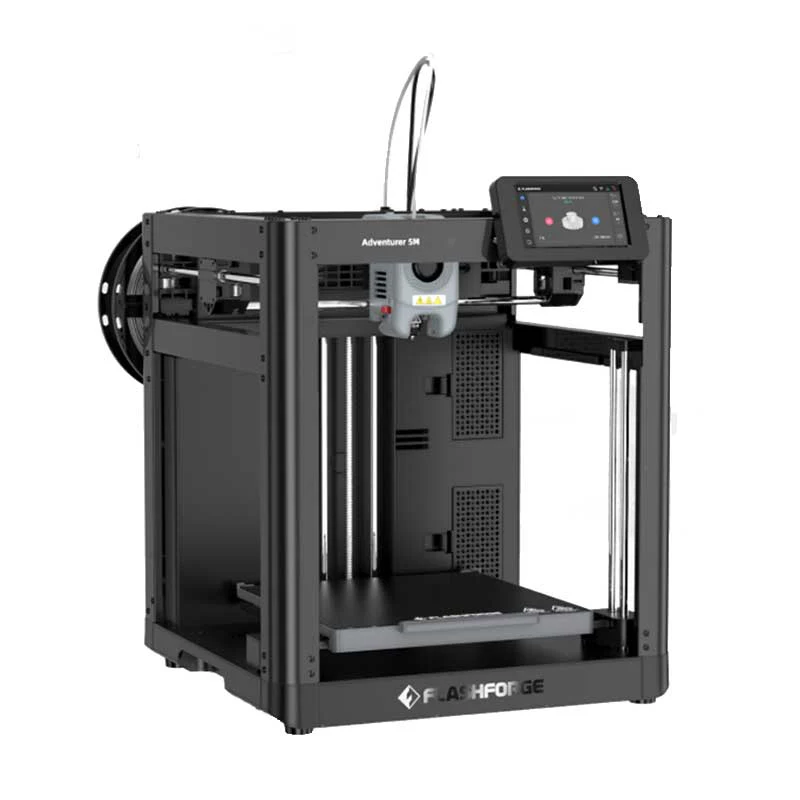
Anatomy of a 3D Printer
Understanding the components of a 3D printer helps in grasping how the printing process works:
Key Components
Extruder: Feeds the filament into the hotend.
Hotend: Heats and melts the filament, allowing it to be deposited onto the build platform.
Build Platform (Heated Bed): The surface on which the object is printed. A heated bed helps in preventing warping and improves adhesion.
Stepper Motors: Control the movement of the printer’s axes (X, Y, and Z) and the extruder, ensuring precise positioning.
Cooling Fans: Help in solidifying the extruded filament quickly, maintaining print quality.
Basic Operation Cycle
Design: Create a 3D model using computer-aided design (CAD) software. See 3D Design for Printing.
Slicing: Convert the 3D model into layers and generate G-code using slicing software. See Preparing to Print.
Printing: The printer reads the G-code and deposits material layer by layer to build the object.
Post-Processing: After printing, the object may require cleaning, support removal, or other finishing processes. See Removing & Cleaning Your Prints.
By understanding these basics, you’re well on your way to becoming proficient in 3D printing. Next, explore 3D Design for Printing to begin modeling, followed by Preparing to Print and Removing & Cleaning Your Prints for printing and cleanup techniques.